
Cookbook / Coding assistants
Visual Studio Code
Privatemode works with AI coding extensions in Visual Studio Code. The officially supported extensions are GitHub Copilot Chat and Cline. We recommend using the Privatemode GitHub Copilot extension for AI chat, editing, and agent mode.
Note
Tab completions can't be routed through Privatemode. GitHub Copilot doesn't allow changing its tab completion model.
Setting up the Privatemode proxy
Follow the API quickstart and choose Other languages to run the Privatemode proxy. Usually, it's advisable to enable prompt caching via --disable-prompt-cache=false.
Configuring GitHub Copilot Chat
You can use Privatemode via GitHub Copilot with the Privatemode VS Code extension. It registers the confidential coding models in GitHub Copilot Chat's model picker and talks to the local proxy, so no API key is entered in VS Code.
- Install the GitHub Copilot Chat extension from the VS Code Marketplace.
- Install the Privatemode VS Code extension, for example via
code --install-extension edgeless-systems.privatemode-vscode. - Choose
glm-latestas the default model. If you want a lower-latency option or vision support, useglm-flash-latest.
See the extension's Marketplace page for details.
Warning
Disable Copilot's tab completions as described in the Privatemode extension. Otherwise, that one feature keeps sending code to GitHub's provider while Copilot Chat runs on Privatemode.
Note
If you're using a GitHub Copilot Business or Enterprise plan, the Manage Models option may not appear. To enable it, switch temporarily to a Pro or Free plan. This limitation is being addressed by Microsoft.
Configuring Cline
-
Install the Cline extension from the VS Code Marketplace.
-
Open the extension settings and select Use your own API key.
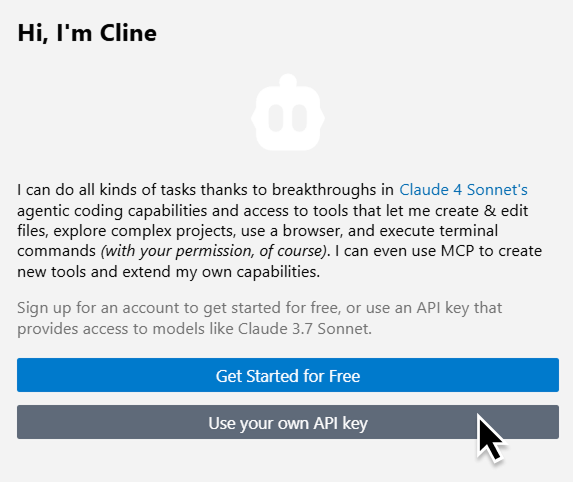
-
Enter the following details in the UI:
- API Provider: OpenAI Compatible
- Base URL:
http://localhost:8080/v1 - API Key: any placeholder value, because the proxy holds your API key
- Model ID:
glm-latest(or another model name described above) - Context Window Size: 1048576
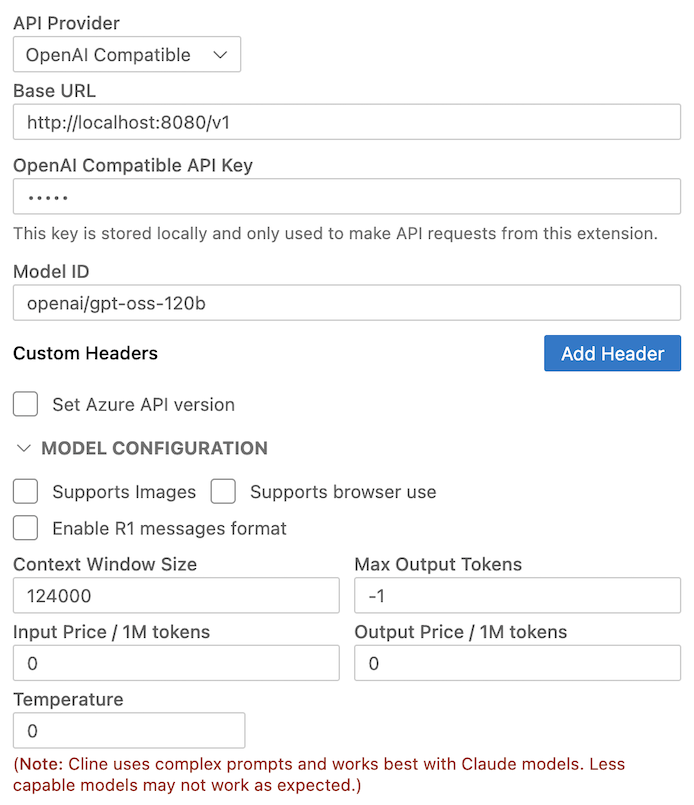
More details on Cline's provider configuration are available in the Cline docs.